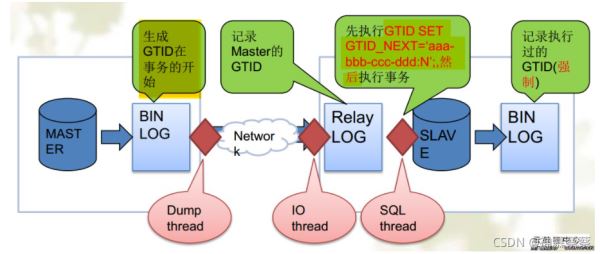
| 版本 | ip | 主机名 | 身份 |
|---|---|---|---|
| centos8 | 192.168.136.239 | master01 | 主库 |
| centos8 | 192.168.136.219 | master02 | 主库 |
| centos8 | 192.168.136.230 | slave | 从库 |
[root@master01 ~]# systemctl stop firewalld
[root@master01 ~]# systemctl disable firewalld
[root@master02 ~]# systemctl stop firewalld
[root@master02 ~]# systemctl disable firewalld
[root@slave ~]# systemctl stop firewalld
[root@slave ~]# systemctl disable firewalld
mysql> grant replication slave on *.* to 'user'@'192.168.136.%' identified by 'user';
[root@slave ~]# mysql -uuser -p'user' -h192.168.136.239
mysql: [Warning] Using a password on the command line interface can be insecure.
Welcome to the MySQL monitor.  Commands end with ; or \g.
Your MySQL connection id is 5
Server version: 5.7.33 MySQL Community Server (GPL)
Copyright (c) 2000, 2021, Oracle and/or its affiliates.
Oracle is a registered trademark of Oracle Corporation and/or its
affiliates. Other names may be trademarks of their respective
owners.
Type 'help;' or '\h' for help. Type '\c' to clear the current input statement.
mysql> grant replication slave on *.* to  'app'@'192.168.136.%' identified by 'app';
Query OK, 0 rows affected, 1 warning (0.01 sec)
mysql> flush privileges;
Query OK, 0 rows affected (0.00 sec)
[root@slave ~]# mysql -uapp -papp -h192.168.136.219
mysql: [Warning] Using a password on the command line interface can be insecure.
Welcome to the MySQL monitor.  Commands end with ; or \g.
Your MySQL connection id is 3
Server version: 5.7.33 MySQL Community Server (GPL)
Copyright (c) 2000, 2021, Oracle and/or its affiliates.
Oracle is a registered trademark of Oracle Corporation and/or its
affiliates. Other names may be trademarks of their respective
owners.
Type 'help;' or '\h' for help. Type '\c' to clear the current input statement.
mysql>
#master01主机:
[root@master01 ~]# cat /etc/my.cnf
[mysqld]
basedir = /usr/local/mysql
datadir = /opt/data
socket = /tmp/mysql.sock
port = 3306
user = mysql
pid-file = /opt/data/mysql.pid
skip-name-resolve
skip-grant-tables
log-bin = master_bin
server-id = 10
gtid-mode = on
enforce-gtid-consistency = on
log-slave-updates = 1
binlog-format = row
skip-slave-start = 1
#master02主机
[mysqld]
basedir = /usr/local/mysql
datadir = /opt/data
socket = /tmp/mysql.sock
port = 3306
user = mysql
pid-file = /opt/data/mysql.pid
skip-name-resolve
                      #replication config
log-bin = master_bin
server-id = 11
gtid-mode = on
enforce-gtid-consistency = on
log-slave-updates = 1
binlog-format = row
skip-slave-start = 1
#slave主机
[mysqld]
basedir = /usr/local/mysql
datadir = /opt/data
socket = /tmp/mysql.sock
port = 3306
user = mysql
pid-file = /opt/data/mysql.pid
skip-name-resolve
log-bin = slave_bin
server-id = 13
gtid-mode = on
enforce-gtid-consistency = on
log-slave-updates = 1
binlog-format = row
skip-slave-start = 1
[root@master01 ~]# systemctl restart mysqld
[root@master02 ~]# systemctl restart mysqld
[root@slave ~]# systemctl restart mysqld
channel(频道):每一个channel都是一个独立的slave服务,都有一个IO_THREAD和SQL_THREAD,原理和普通复制一样,只是需要在change master to语句后面使用FOR Channel来进行区分slave
在使用channel时需要将从库的master-info-repository、relay-log-info-repository设置为table,否则会报错。
将信息存储库设置为table格式
方式一(mysql内设置):
set global master_info_repository='table';
set global relay_log_info_repository='table';
方式二(/etc/my.cnf内设置):
3.在my.cnf中设置
master_info_repository    = TABLE
relay_log_info_repository = TABLE
#检查是否更改成功
mysql> show variables where variable_name in  ('relay_log_info_repository','master_info_repository');
+---------------------------+-------+
| Variable_name             | Value |
+---------------------------+-------+
| master_info_repository    | TABLE |
| relay_log_info_repository | TABLE |
+---------------------------+-------+
#slave从库上配置俩个主库GTID复制
mysql> change master to
    -> master_host='192.168.136.219',  #mysql02主库ip
    -> master_user='app',              #mysql02主库授权的普通用户
    -> master_password='app',           #mysql02主库授权的普通用户密码
    -> master_port=3306,              #主库端口
    -> master_auto_position=1 for channel 'master01';   #位置从1开始同步,并且第一个slave取名master01
mysql> change master to
    -> master_host='192.168.136.239',  #mysql01主库ip
    -> master_user='user',
    -> master_password='user',
    -> master_port=3306,              #主库端口
    -> master_auto_position=1 for channel 'master02';   #位置从1开始同步,并且第一个slave取名master01
#查看俩个slave状态
mysql> show slave status\G;
*************************** 1. row ***************************
               Slave_IO_State:
                  Master_Host: 192.168.136.219
                  Master_User: app
                  Master_Port: 3306
                Connect_Retry: 60
              Master_Log_File:
          Read_Master_Log_Pos: 4
               Relay_Log_File: slave02-relay-bin-master1.000001
                Relay_Log_Pos: 4
        Relay_Master_Log_File:
             Slave_IO_Running: No
            Slave_SQL_Running: No         #都是关闭的
              Replicate_Do_DB:
          Replicate_Ignore_DB:
           Replicate_Do_Table:
       Replicate_Ignore_Table:
      Replicate_Wild_Do_Table:
  Replicate_Wild_Ignore_Table:
                   Last_Errno: 0
                   Last_Error:
                 Skip_Counter: 0
          Exec_Master_Log_Pos: 0
              Relay_Log_Space: 154
              Until_Condition: None
               Until_Log_File:
                Until_Log_Pos: 0
           Master_SSL_Allowed: No
           Master_SSL_CA_File:
           Master_SSL_CA_Path:
              Master_SSL_Cert:
            Master_SSL_Cipher:
               Master_SSL_Key:
        Seconds_Behind_Master: NULL
Master_SSL_Verify_Server_Cert: No
                Last_IO_Errno: 0
                Last_IO_Error:
               Last_SQL_Errno: 0
               Last_SQL_Error:
  Replicate_Ignore_Server_Ids:
             Master_Server_Id: 0
                  Master_UUID:
             Master_Info_File: mysql.slave_master_info
                    SQL_Delay: 0
          SQL_Remaining_Delay: NULL
      Slave_SQL_Running_State:
           Master_Retry_Count: 86400
                  Master_Bind:
      Last_IO_Error_Timestamp:
     Last_SQL_Error_Timestamp:
               Master_SSL_Crl:
           Master_SSL_Crlpath:
           Retrieved_Gtid_Set:
            Executed_Gtid_Set: b4326a77-0a31-11ec-a991-000c298d3571:1-2,
d68b404d-0a35-11ec-9df1-000c29581959:1
                Auto_Position: 1
         Replicate_Rewrite_DB:
                 Channel_Name: master1
           Master_TLS_Version:
*************************** 2. row ***************************
               Slave_IO_State:
                  Master_Host: 192.168.136.239
                  Master_User: user
                  Master_Port: 3306
                Connect_Retry: 60
              Master_Log_File:
          Read_Master_Log_Pos: 4
               Relay_Log_File: slave02-relay-bin-master2.000001
                Relay_Log_Pos: 4
        Relay_Master_Log_File:
             Slave_IO_Running: No
            Slave_SQL_Running: No
              Replicate_Do_DB:
          Replicate_Ignore_DB:
           Replicate_Do_Table:
       Replicate_Ignore_Table:
      Replicate_Wild_Do_Table:
  Replicate_Wild_Ignore_Table:
                   Last_Errno: 0
                   Last_Error:
                 Skip_Counter: 0
          Exec_Master_Log_Pos: 0
              Relay_Log_Space: 154
              Until_Condition: None
               Until_Log_File:
                Until_Log_Pos: 0
           Master_SSL_Allowed: No
           Master_SSL_CA_File:
           Master_SSL_CA_Path:
              Master_SSL_Cert:
            Master_SSL_Cipher:
               Master_SSL_Key:
        Seconds_Behind_Master: NULL
Master_SSL_Verify_Server_Cert: No
                Last_IO_Errno: 0
                Last_IO_Error:
               Last_SQL_Errno: 0
               Last_SQL_Error:
  Replicate_Ignore_Server_Ids:
             Master_Server_Id: 0
                  Master_UUID:
             Master_Info_File: mysql.slave_master_info
                    SQL_Delay: 0
          SQL_Remaining_Delay: NULL
      Slave_SQL_Running_State:
           Master_Retry_Count: 86400
                  Master_Bind:
      Last_IO_Error_Timestamp:
     Last_SQL_Error_Timestamp:
               Master_SSL_Crl:
           Master_SSL_Crlpath:
           Retrieved_Gtid_Set:
            Executed_Gtid_Set: b4326a77-0a31-11ec-a991-000c298d3571:1-2,
d68b404d-0a35-11ec-9df1-000c29581959:1
                Auto_Position: 1
         Replicate_Rewrite_DB:
                 Channel_Name: master2
           Master_TLS_Version:
2 rows in set (0.00 sec)
#开启俩个slave
mysql> start slave;
#再次查看状态
#master01主库创建一个test数据库
mysql> create database test;
Query OK, 1 row affected (0.00 sec)
mysql>  show databases;
+--------------------+
| Database           |
+--------------------+
| information_schema |
| mysql              |
| performance_schema |
| sys                |
| test               |
+--------------------+
5 rows in set (0.00 sec)
#master02主库上查看
mysql>  show databases;
+--------------------+
| Database           |
+--------------------+
| information_schema |
| mysql              |
| performance_schema |
| sys                |                  #没有内容
+--------------------+
4 rows in set (0.00 sec)
#slave从库查看
mysql> show databases;
+--------------------+
| Database           |
+--------------------+
| information_schema |
| mysql              |
| performance_schema |
| sys                |
| test               |          #已经同步了test库
+--------------------+
5 rows in set (0.00 sec)
#mysql02主库创建一个RHCA数据库
mysql> create database RHCA;
Query OK, 1 row affected (0.01 sec)
mysql>  show databases;
+--------------------+
| Database           |
+--------------------+
| information_schema |
| RHCA               |
| mysql              |
| performance_schema |
| sys                |
+--------------------+
5 rows in set (0.00 sec)
#slave从库
mysql> show databases;
+--------------------+
| Database           |
+--------------------+
| information_schema |
| RHCA               |
| mysql              |
| performance_schema |
| sys                |             #有了mysql01主库的test库和mysql02的RHCA的库
| test               |
+--------------------+
6 rows in set (0.00 sec)
show slave status; //查看全部slave状态
show slave status for channel ‘naem'; //查看单个slave状态
reset slave; #重置全部slave
reset slave for channel ‘master1'; #重置单个slave
stop slave for channel ‘master1'; #暂停单个slave
start slave for channel ‘master1'; #开启单个slave
虽然我在做的过程没有遇到错误,但是下面这个是最最容易出现的错误
配置完开启slave出现报错
mysql> start slave;
ERROR 1872 (HY000): Slave failed to initialize relay log info structure from the repository
由于mysql.slave_relay_log_info表中保留了以前的复制信息,导致新从库启动时无法找到对应文件,那么我们清理掉该表中的记录即可
mysql> reset slave;
Query OK, 0 rows affected (0.00 sec)
以上就是MySQL示例DTID主从原理解析的详细内容,更多关于MySQL示例DTID主从原理的资料请关注脚本之家其它相关文章!

下一篇:MySQL 基础常用命令总结