最近学习了如何实现无刷新登录,大体的效果如下(界面比较丑,请自行忽略....):
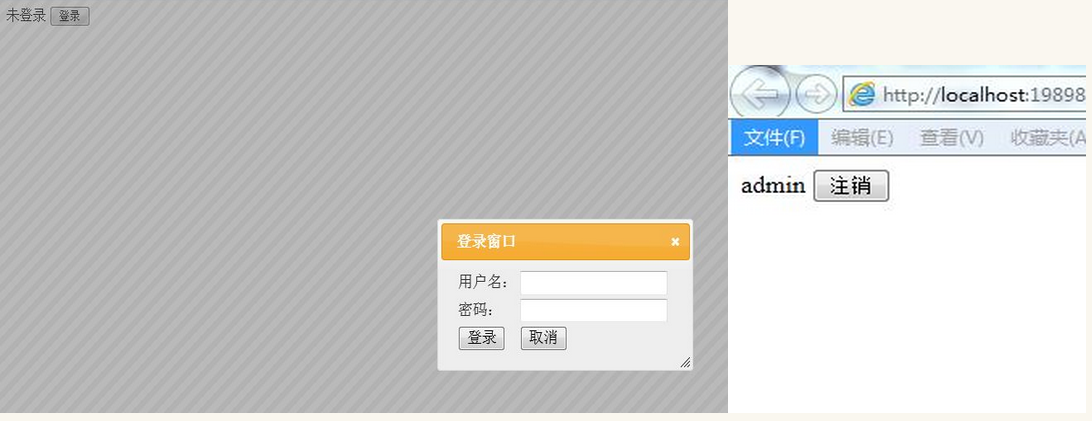
点击登录按钮时弹出登录窗口,输入正确的用户名密码后点击登录则登录窗口关闭,状态改为当前用户名.
第一步:
首先弹出窗口使用的是jquery-ui中的控件,第一步要学会如何使用.
打开解压后的jquery-UI下的development-bundle->demos,找到index.html,选择dialog下的model dialog,右键查看源码,观察如何使用该控件,找到一句关键代码:$("#dialog-modal").dialog({height: 140,modal: true});这是用于显示的,打开model message中的源码,找到关闭的关键代码:$(this).dialog('close');有了这两句代码,可以控制窗口的显示与关闭,可以进行下一步了.使用时需复制jquery-ui开发包的css文件夹,js文件夹到项目中.
第二步:
在这里先贴出处理AJAX请求的一般处理程序的代码,虽然正真写的时候都是用到再写,但这里不可能一步一步详细列出,为了便于理解,先将一般处理程序代码贴出来:
1.IsLogin.ashx,用于判断用户是否登录,登录则返回用户名.这里注意,在一般处理程序中要使用session,必须引入using System.Web.SessionState且要实现IRequiresSessionState接口
using System;
using System.Collections.Generic;
using System.Linq;
using System.Web;
using System.Web.SessionState;
namespace AJAX无刷新登录.AJAX
{
 /// summary>
 /// IsLogin 的摘要说明
 /// /summary>
 public class IsLogin : IHttpHandler,IRequiresSessionState
 {
  public void ProcessRequest(HttpContext context)
  {
   context.Response.ContentType = "text/plain";
   if (context.Session["userName"] != null)
   {
    string userName = context.Session["userName"].ToString();
    context.Response.Write("yes|"+userName);
   }
   else
   {
    context.Response.Write("no");
   }
  }
  public bool IsReusable
  {
   get
   {
    return false;
   }
  }
 }
}
2.CheckLogin.ashx,用于检测用户输入用户名密码是否匹配,正确则返回yes,错误返回no,这里为了简便没有连接数据库.
using System;
using System.Collections.Generic;
using System.Linq;
using System.Web;
using System.Web.SessionState;
namespace AJAX无刷新登录.AJAX
{
 /// summary>
 /// CheckLogin 的摘要说明
 /// /summary>
 public class CheckLogin : IHttpHandler,IRequiresSessionState
 {
  public void ProcessRequest(HttpContext context)
  {
   context.Response.ContentType = "text/plain";
   string userName = context.Request["userName"];
   string password=context.Request["password"];
   if (userName=="admin"password=="admin")
   {
    context.Session["userName"] = "admin";
    context.Response.Write("ok");
   }
   else
   {
    context.Response.Write("no");
   }
  }
  public bool IsReusable
  {
   get
   {
    return false;
   }
  }
 }
}
3.LoginOut.ashx,用于控制用户登出,设置session为空.
using System;
using System.Collections.Generic;
using System.Linq;
using System.Web;
using System.Web.SessionState;
namespace AJAX无刷新登录.AJAX
{
 /// summary>
 /// LoginOut 的摘要说明
 /// /summary>
 public class LoginOut : IHttpHandler,IRequiresSessionState
 {
  public void ProcessRequest(HttpContext context)
  {
   context.Response.ContentType = "text/plain";
   context.Session["userName"] = null;
  }
  public bool IsReusable
  {
   get
   {
    return false;
   }
  }
 }
}
一般处理程序就结束了,下面贴出主界面的代码:
%@ Page Language="C#" AutoEventWireup="true" CodeBehind="Login.aspx.cs" Inherits="AJAX无刷新登录.Login" %>
!DOCTYPE html>

html xmlns="http://www.w3.org/1999/xhtml">
head runat="server">
 meta http-equiv="Content-Type" content="text/html; charset=utf-8" />
 title>/title>
 link href="JQueryUI/css/ui-lightness/jquery-ui-1.8.2.custom.css" rel="stylesheet" />
 script src="JQueryUI/jquery-1.4.2.min.js">/script>
 script src="JQueryUI/jquery-ui-1.8.2.custom.min.js">/script>
 script type="text/javascript">
  //判断是否登录,登录则显示登录名,隐藏登录按钮,显示注销按钮
  //否则相反
  var isLogin = function () {
   $.post("/AJAX/IsLogin.ashx", function (data) {
    var strs = data.split('|');
    if (strs[0] == "yes") {
     $("#divShowLogin").hide();
     $("#divShowLoginOut").show();
     $("#spanName").text(strs[1]);
    } else {
     $("#divShowLogin").show();
     $("#divShowLoginOut").hide();
     $("#spanState").text("未登录");
    }
   });
  }

  $(function () {
   isLogin();
   //点击登录弹出登录窗口
   $("#btnShowLogin").click(function () {
    //模态窗口,设定长宽
    $("#divLogin").dialog({
     height: 160,
     width: 300,
     modal: true
    });
   });

   //点击取消则关闭弹出框
   $("#btnCancel").click(function () {
    $("#divLogin").dialog('close');
   });

   //点击登录发送post请求在一般处理程序CheckLogin.ashx中验证登录,
   //根据回调函数结果判断是否登录成功
   $("#btnLogin").click(function () {
    var userName = $("#txtUserName").val();
    var password = $("#txtPwd").val();
    $.post("/AJAX/CheckLogin.ashx", { "userName": userName, "password": password }, function (data) {
     if (data == "ok") {
      $("#divLogin").dialog('close');
      isLogin();
     }
     else {
      alert("用户名或密码错误");
     }
    });
   });

   //点击注销发送post请求,在一般处理程序中设置session为null,并调用isLogin函数刷新状态
   $("#btnExit").click(function () {
    $.post("/AJAX/LoginOut.ashx", function () {
     isLogin();
    });

   });

  });
 /script>
/head>
body>
 form id="form1" runat="server">
  div id="divShowLogin" style="display: none">
   span id="spanState">/span>
   input type="button" value="登录" id="btnShowLogin" />
  /div>
  div id="divShowLoginOut" style="display: none">
   span id="spanName">/span>
   input type="button" value="注销" id="btnExit" />
  /div>
  div id="divLogin" title="登录窗口" style="display: none">
   table style="text-align: left" id="tbLoin">
    tr>
     td>用户名:/td>
     td>
      input type="text" id="txtUserName" />/td>
    /tr>
    tr>
     td>密码:/td>
     td>
      input type="password" id="txtPwd" />/td>
    /tr>
    tr>
     td>
      input type="button" value="登录" id="btnLogin" />/td>
     td style="text-align: left">
      input type="button" value="取消" id="btnCancel" />/td>
    /tr>
   /table>
  /div>
 /form>
/body>
/html>
以上所述是小编给大家介绍的AJAX如何实现无刷新登录功能,希望对大家有所帮助,如果大家有任何疑问请给我留言,小编会及时回复大家的。在此也非常感谢大家对脚本之家网站的支持!
您可能感兴趣的文章:- jQuery基于ajax实现页面加载后检查用户登录状态的方法
- jQuery Ajax 实现在html页面实时显示用户登录状态
- Ajax实现带有验证码的局部刷新登录界面
- jQuery+Ajax用户登录功能的实现
- 一款经典的ajax登录页面 后台asp.net
- jquery ajax 登录验证实现代码
- 基于jquery ajax 用户无刷新登录方法详解
- PHP+jQuery+Ajax实现用户登录与退出
- asp.net jQuery Ajax用户登录功能的实现
- ajax实现登录功能