给 TextBox文本框前添加图片
扩展PhoneTextBox:添加一个类“ExtentPhoneTextBox”继承 PhoneTextBox ,在“ExtentPhoneTextBox”类中添加属性项:
复制代码 代码如下:
public class ExtentPhoneTextBox : PhoneTextBox
{
/// summary>
/// 文本框图片属性
/// /summary>
public static readonly DependencyProperty TextHeadImageProperty =
DependencyProperty.Register("TextHeadImage", typeof(ImageSource), typeof(ExtentPhoneTextBox), new PropertyMetadata(null)
);
/// summary>
/// 文本框头图片
/// /summary>
public ImageSource TextHeadImage
{
get { return base.GetValue(TextHeadImageProperty) as ImageSource; }
set { base.SetValue(TextHeadImageProperty, value); }
}
/// summary>
/// 文本图片宽度
/// /summary>
public double TextHeadImageWidth
{
get { return (double)GetValue(TextHeadImageWidthProperty); }
set { SetValue(TextHeadImageWidthProperty, value); }
}
// Using a DependencyProperty as the backing store for TextHeadImageWidth. This enables animation, styling, binding, etc...
public static readonly DependencyProperty TextHeadImageWidthProperty =
DependencyProperty.Register("TextHeadImageWidth", typeof(double), typeof(ExtentPhoneTextBox), new PropertyMetadata(null));
/// summary>
/// 文本图片高度
/// /summary>
public double TextHeadImageHeight
{
get { return (double)GetValue(TextHeadImageHeightProperty); }
set { SetValue(TextHeadImageHeightProperty, value); }
}
// Using a DependencyProperty as the backing store for TextHeadImageHeight. This enables animation, styling, binding, etc...
public static readonly DependencyProperty TextHeadImageHeightProperty =
DependencyProperty.Register("TextHeadImageHeight", typeof(double), typeof(ExtentPhoneTextBox), new PropertyMetadata(null));
}
}
ExtentPhoneText 样式编辑:
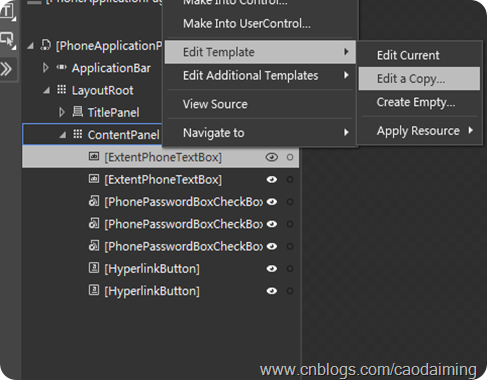
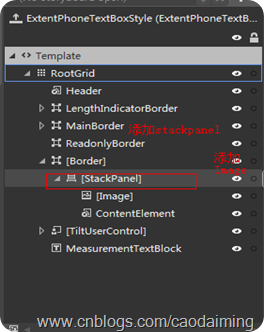
全部样式如下:
复制代码 代码如下:
DataTemplate x:Key="ControlHeaderTemplate">
TextBlock FontSize="{StaticResource PhoneFontSizeNormal}" FontFamily="{StaticResource PhoneFontFamilyNormal}" LineStackingStrategy="BlockLineHeight" LineHeight="23.333" Margin="0,-9,0,0" TextWrapping="Wrap" Text="{Binding}">
TextBlock.RenderTransform>
TranslateTransform X="-1" Y="4"/>
/TextBlock.RenderTransform>
/TextBlock>
/DataTemplate>
toolkit:SingleDataTemplateSelector x:Key="ControlHeaderTemplateSelector" Template="{StaticResource ControlHeaderTemplate}"/>
Style x:Key="ExtentPhoneTextBoxStyle" TargetType="ExtentCtrs:ExtentPhoneTextBox">
Setter Property="FontFamily" Value="{StaticResource PhoneFontFamilyNormal}"/>
Setter Property="FontSize" Value="{StaticResource PhoneFontSizeMediumLarge}"/>
Setter Property="Background" Value="{StaticResource PhoneTextBoxBrush}"/>
Setter Property="Foreground" Value="{StaticResource PhoneTextBoxForegroundBrush}"/>
Setter Property="BorderBrush" Value="{StaticResource PhoneTextBoxBrush}"/>
Setter Property="SelectionBackground" Value="{StaticResource PhoneAccentBrush}"/>
Setter Property="SelectionForeground" Value="{StaticResource PhoneTextBoxSelectionForegroundBrush}"/>
Setter Property="BorderThickness" Value="{StaticResource PhoneBorderThickness}"/>
Setter Property="Padding" Value="6,0,6,4"/>
Setter Property="HorizontalContentAlignment" Value="Left"/>
Setter Property="Template">
Setter.Value>
ControlTemplate TargetType="ExtentCtrs:ExtentPhoneTextBox">
Grid x:Name="RootGrid" Background="Transparent">
Grid.RowDefinitions>
RowDefinition Height="Auto"/>
RowDefinition/>
/Grid.RowDefinitions>
VisualStateManager.VisualStateGroups>
VisualStateGroup x:Name="CommonStates">
VisualState x:Name="Normal"/>
VisualState x:Name="Disabled">
Storyboard>
ObjectAnimationUsingKeyFrames Storyboard.TargetProperty="Foreground" Storyboard.TargetName="Header">
DiscreteObjectKeyFrame KeyTime="0" Value="{StaticResource PhoneTextLowContrastBrush}"/>
/ObjectAnimationUsingKeyFrames>
ObjectAnimationUsingKeyFrames Storyboard.TargetProperty="Background" Storyboard.TargetName="MainBorder">
DiscreteObjectKeyFrame KeyTime="0" Value="Transparent"/>
/ObjectAnimationUsingKeyFrames>
ObjectAnimationUsingKeyFrames Storyboard.TargetProperty="BorderBrush" Storyboard.TargetName="MainBorder">
DiscreteObjectKeyFrame KeyTime="0" Value="{StaticResource PhoneDisabledBrush}"/>
/ObjectAnimationUsingKeyFrames>
ObjectAnimationUsingKeyFrames Storyboard.TargetProperty="Foreground" Storyboard.TargetName="ContentElement">
DiscreteObjectKeyFrame KeyTime="0" Value="{StaticResource PhoneDisabledBrush}"/>
/ObjectAnimationUsingKeyFrames>
/Storyboard>
/VisualState>
VisualState x:Name="ReadOnly">
Storyboard>
ObjectAnimationUsingKeyFrames Storyboard.TargetProperty="Visibility" Storyboard.TargetName="MainBorder">
DiscreteObjectKeyFrame KeyTime="0">
DiscreteObjectKeyFrame.Value>
Visibility>Collapsed/Visibility>
/DiscreteObjectKeyFrame.Value>
/DiscreteObjectKeyFrame>
/ObjectAnimationUsingKeyFrames>
ObjectAnimationUsingKeyFrames Storyboard.TargetProperty="Visibility" Storyboard.TargetName="ReadonlyBorder">
DiscreteObjectKeyFrame KeyTime="0">
DiscreteObjectKeyFrame.Value>
Visibility>Visible/Visibility>
/DiscreteObjectKeyFrame.Value>
/DiscreteObjectKeyFrame>
/ObjectAnimationUsingKeyFrames>
ObjectAnimationUsingKeyFrames Storyboard.TargetProperty="Background" Storyboard.TargetName="ReadonlyBorder">
DiscreteObjectKeyFrame KeyTime="0" Value="{StaticResource PhoneTextBoxBrush}"/>
/ObjectAnimationUsingKeyFrames>
ObjectAnimationUsingKeyFrames Storyboard.TargetProperty="BorderBrush" Storyboard.TargetName="ReadonlyBorder">
DiscreteObjectKeyFrame KeyTime="0" Value="{StaticResource PhoneTextBoxBrush}"/>
/ObjectAnimationUsingKeyFrames>
ObjectAnimationUsingKeyFrames Storyboard.TargetProperty="Foreground" Storyboard.TargetName="ContentElement">
DiscreteObjectKeyFrame KeyTime="0" Value="{StaticResource PhoneTextBoxReadOnlyBrush}"/>
/ObjectAnimationUsingKeyFrames>
/Storyboard>
/VisualState>
/VisualStateGroup>
VisualStateGroup x:Name="FocusStates">
VisualState x:Name="Focused">
Storyboard>
ObjectAnimationUsingKeyFrames Storyboard.TargetProperty="Background" Storyboard.TargetName="MainBorder">
DiscreteObjectKeyFrame KeyTime="0" Value="{StaticResource PhoneTextBoxEditBackgroundBrush}"/>
/ObjectAnimationUsingKeyFrames>
ObjectAnimationUsingKeyFrames Storyboard.TargetProperty="BorderBrush" Storyboard.TargetName="MainBorder">
DiscreteObjectKeyFrame KeyTime="0" Value="{StaticResource PhoneTextBoxEditBorderBrush}"/>
/ObjectAnimationUsingKeyFrames>
/Storyboard>
/VisualState>
VisualState x:Name="Unfocused"/>
/VisualStateGroup>
VisualStateGroup x:Name="LengthIndicatorStates">
VisualStateGroup.Transitions>
VisualTransition From="LengthIndicatorHidden" To="LengthIndicatorVisible">
Storyboard>
ObjectAnimationUsingKeyFrames Storyboard.TargetProperty="Visibility" Storyboard.TargetName="LengthIndicator">
DiscreteObjectKeyFrame KeyTime="0:0:0">
DiscreteObjectKeyFrame.Value>
Visibility>Visible/Visibility>
/DiscreteObjectKeyFrame.Value>
/DiscreteObjectKeyFrame>
/ObjectAnimationUsingKeyFrames>
ObjectAnimationUsingKeyFrames Storyboard.TargetProperty="Margin" Storyboard.TargetName="RootGrid">
DiscreteObjectKeyFrame KeyTime="0:0:0" Value="0, 0, 0, 25"/>
/ObjectAnimationUsingKeyFrames>
ObjectAnimationUsingKeyFrames Storyboard.TargetProperty="Opacity" Storyboard.TargetName="LengthIndicator">
DiscreteObjectKeyFrame KeyTime="0:0:0" Value="1"/>
/ObjectAnimationUsingKeyFrames>
DoubleAnimation Duration="0:0:0.350" To="27" Storyboard.TargetProperty="(UIElement.RenderTransform).(TranslateTransform.Y)" Storyboard.TargetName="LengthIndicator">
DoubleAnimation.EasingFunction>
ExponentialEase Exponent="6"/>
/DoubleAnimation.EasingFunction>
/DoubleAnimation>
/Storyboard>
/VisualTransition>
VisualTransition From="LengthIndicatorVisible" To="LengthIndicatorHidden">
Storyboard>
DoubleAnimation Duration="0:0:0.350" To="0" Storyboard.TargetProperty="(UIElement.RenderTransform).(TranslateTransform.Y)" Storyboard.TargetName="LengthIndicator">
DoubleAnimation.EasingFunction>
ExponentialEase Exponent="6"/>
/DoubleAnimation.EasingFunction>
/DoubleAnimation>
ObjectAnimationUsingKeyFrames Storyboard.TargetProperty="Margin" Storyboard.TargetName="RootGrid">
DiscreteObjectKeyFrame KeyTime="0:0:0" Value="0, 0, 0, 0"/>
/ObjectAnimationUsingKeyFrames>
ObjectAnimationUsingKeyFrames Storyboard.TargetProperty="Opacity" Storyboard.TargetName="LengthIndicator">
DiscreteObjectKeyFrame KeyTime="0:0:0.350" Value="0"/>
/ObjectAnimationUsingKeyFrames>
ObjectAnimationUsingKeyFrames Storyboard.TargetProperty="Visibility" Storyboard.TargetName="LengthIndicator">
DiscreteObjectKeyFrame KeyTime="0:0:0.350">
DiscreteObjectKeyFrame.Value>
Visibility>Collapsed/Visibility>
/DiscreteObjectKeyFrame.Value>
/DiscreteObjectKeyFrame>
/ObjectAnimationUsingKeyFrames>
/Storyboard>
/VisualTransition>
/VisualStateGroup.Transitions>
VisualState x:Name="LengthIndicatorVisible">
Storyboard>
ObjectAnimationUsingKeyFrames Storyboard.TargetProperty="Visibility" Storyboard.TargetName="LengthIndicator">
DiscreteObjectKeyFrame KeyTime="0:0:0">
DiscreteObjectKeyFrame.Value>
Visibility>Visible/Visibility>
/DiscreteObjectKeyFrame.Value>
/DiscreteObjectKeyFrame>
/ObjectAnimationUsingKeyFrames>
ObjectAnimationUsingKeyFrames Storyboard.TargetProperty="Margin" Storyboard.TargetName="RootGrid">
DiscreteObjectKeyFrame KeyTime="0:0:0" Value="0, 0, 0, 25"/>
/ObjectAnimationUsingKeyFrames>
ObjectAnimationUsingKeyFrames Storyboard.TargetProperty="Opacity" Storyboard.TargetName="LengthIndicator">
DiscreteObjectKeyFrame KeyTime="0:0:0" Value="1"/>
/ObjectAnimationUsingKeyFrames>
DoubleAnimation Duration="0" To="27" Storyboard.TargetProperty="(UIElement.RenderTransform).(TranslateTransform.Y)" Storyboard.TargetName="LengthIndicator"/>
/Storyboard>
/VisualState>
VisualState x:Name="LengthIndicatorHidden"/>
/VisualStateGroup>
/VisualStateManager.VisualStateGroups>
toolkit:PhoneContentControl x:Name="Header" ContentTemplate="{TemplateBinding HeaderTemplate}" ContentTemplateSelector="{StaticResource ControlHeaderTemplateSelector}" Content="{TemplateBinding Header}" Foreground="{StaticResource PhoneTextMidContrastBrush}" FontSize="{StaticResource PhoneFontSizeNormal}" FontFamily="{StaticResource PhoneFontFamilyNormal}" HorizontalContentAlignment="{TemplateBinding HorizontalContentAlignment}" Margin="{StaticResource PhoneHorizontalMargin}"/>
Border x:Name="LengthIndicatorBorder" Grid.Row="1">
TextBlock x:Name="LengthIndicator" CacheMode="BitmapCache" Foreground="{StaticResource PhoneTextMidContrastBrush}" FontSize="{StaticResource PhoneFontSizeNormal}" FontFamily="{StaticResource PhoneFontFamilyNormal}" HorizontalAlignment="Right" Margin="{StaticResource PhoneMargin}" Opacity="0" TextAlignment="Right" Visibility="Collapsed" VerticalAlignment="Bottom">
TextBlock.RenderTransform>
TranslateTransform/>
/TextBlock.RenderTransform>
/TextBlock>
/Border>
Border x:Name="MainBorder" BorderBrush="{TemplateBinding BorderBrush}" BorderThickness="{TemplateBinding BorderThickness}" Background="{TemplateBinding Background}" Margin="{StaticResource PhoneTouchTargetOverhang}" Grid.Row="1">
TextBlock x:Name="PlaceholderTextElement" Foreground="{StaticResource PhoneTextBoxReadOnlyBrush}" HorizontalAlignment="Left" Padding="{TemplateBinding Padding}" Text="{TemplateBinding PlaceholderText}" VerticalAlignment="Center" Margin="40,2,0,2"/>
/Border>
Border x:Name="ReadonlyBorder" BorderBrush="{StaticResource PhoneDisabledBrush}" BorderThickness="{TemplateBinding BorderThickness}" Background="Transparent" Margin="{StaticResource PhoneTouchTargetOverhang}" Grid.Row="1" Visibility="Collapsed"/>
Border BorderBrush="Transparent" BorderThickness="{TemplateBinding BorderThickness}" Background="Transparent" Margin="{StaticResource PhoneTouchTargetOverhang}" Grid.Row="1">
StackPanel Orientation="Horizontal">
Image Source="{TemplateBinding TextHeadImage}" Width="{TemplateBinding TextHeadImageWidth}" Height="{TemplateBinding TextHeadImageWidth}" HorizontalAlignment="Left" Margin="12,2,1,2"/>
ContentControl x:Name="ContentElement" BorderThickness="0" CacheMode="BitmapCache" HorizontalContentAlignment="Stretch" Padding="{TemplateBinding Padding}" VerticalContentAlignment="Stretch" VerticalAlignment="Center"/>
/StackPanel>
/Border>
toolkitPrimitives:TiltUserControl HorizontalAlignment="Right" Margin="0,0,-12,0" Grid.Row="1" VerticalAlignment="Bottom">
Border x:Name="ActionIconBorder" Background="Transparent" Height="72" Width="96">
Image x:Name="ActionIcon" HorizontalAlignment="Right" Height="26" Margin="0,0,36,0" Source="{TemplateBinding ActionIcon}"/>
/Border>
/toolkitPrimitives:TiltUserControl>
TextBlock x:Name="MeasurementTextBlock" FontWeight="{TemplateBinding FontWeight}" FontStyle="{TemplateBinding FontStyle}" FontStretch="{TemplateBinding FontStretch}" FontSize="{TemplateBinding FontSize}" FontFamily="{TemplateBinding FontFamily}" IsHitTestVisible="False" Margin="8" Opacity="0" Grid.Row="1" TextAlignment="{TemplateBinding TextAlignment}" TextWrapping="{TemplateBinding TextWrapping}" Text="{TemplateBinding Text}"/>
/Grid>
/ControlTemplate>
/Setter.Value>
/Setter>
/Style>
UI部局xaml代码如下:
Grid x:Name="ContentPanel"
Margin="0,162,24,19"
Grid.RowSpan="2">
ExtentCtrs:ExtentPhoneTextBox Margin="12,10,12,0"
TextWrapping="Wrap"
VerticalAlignment="Top"
PlaceholderText="QQ号码/手机/邮箱"
Height="80"
Background="White" TextHeadImage="/Assets/QqAccount.WVGA.png" Style="{StaticResource ExtentPhoneTextBoxStyle}" TextHeadImageHeight="22" TextHeadImageWidth="24" />
ExtentCtrs:ExtentPhoneTextBox Margin="12,107,12,0"
TextWrapping="Wrap"
VerticalAlignment="Top"
PlaceholderText="点击输入QQ密码"
Height="80"
Background="White" Style="{StaticResource ExtentPhoneTextBoxStyle}" TextHeadImage="/Assets/Password.WVGA.png" TextHeadImageHeight="22" TextHeadImageWidth="24" />
toolkitPrimitives:PhonePasswordBoxCheckBox Content="记住密码"
HorizontalAlignment="Left"
Margin="12,195,0,0"
VerticalAlignment="Top"
HorizontalContentAlignment="Left" />
toolkitPrimitives:PhonePasswordBoxCheckBox Content="隐身登录"
HorizontalAlignment="Left"
Margin="224,195,0,0"
VerticalAlignment="Top" />
toolkitPrimitives:PhonePasswordBoxCheckBox Content="静音登录"
HorizontalAlignment="Left"
Margin="12,272,0,0"
VerticalAlignment="Top" />
HyperlinkButton Content="注册帐号"
HorizontalAlignment="Left"
Margin="12,349,0,0"
VerticalAlignment="Top"
HorizontalContentAlignment="Left" />
HyperlinkButton Content="找回密码"
HorizontalAlignment="Left"
Margin="12,385,0,0"
VerticalAlignment="Top"
HorizontalContentAlignment="Left" />
/Grid>
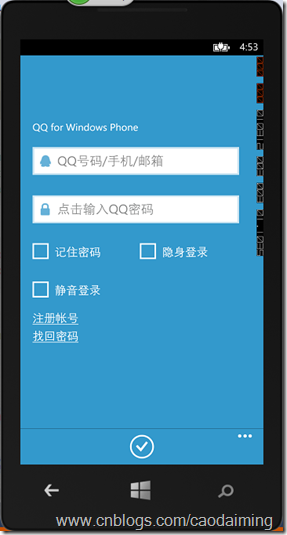
运行效果如下:
您可能感兴趣的文章:- js如何调用qq互联api实现第三方登录
- python登录QQ邮箱发信的实现代码
- 用VBScript制作QQ自动登录的脚本代码
- ASP.NET实现QQ、微信、新浪微博OAuth2.0授权登录
- Android调用第三方QQ登录代码分享
- Yii2中OAuth扩展及QQ互联登录实现方法
- jquery仿QQ登录账号选择下拉框效果
- Python脚本简单实现打开默认浏览器登录人人和打开QQ的方法
- Python的Flask框架应用程序实现使用QQ账号登录的方法
- Android QQ登录界面绘制代码